Regions are able to use the Pro features of Canva at no cost.
Before you begin the process of requesting the nonprofit benefits create a free Canva account using the email address associated with your Association Platform profile.
Recommended before submitting:
Region email address is listed on bottom of Region website under Contact Us section (edit in settings on home page)
Use same AYSO email address to register
Create free Canva account with Region email- Do NOT opt-in to the free trial of Canva Pro.
In Canva account settings go to your profile, scroll to "What will you be using Canva for?", select "Non-profit or charity".
Region website has a custom AYSO URL - Ex. ayso9697.org or aysoCityName.org
Email support@ayso.org requesting a custom domain name
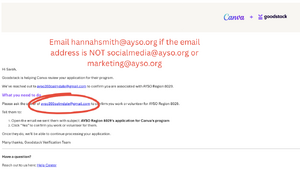
Make sure the email listed is marketing@ayso.org or socialmedia@ayso.orgCanva x Goodstack will send the email provided a verification notice. Please note which email Canva x Goodstack is sending the verification request to. If it isn't socialmedia@ayso.org or marketing@ayso.org, please email hannahsmith@ayso.org. Picture example ---->
If everything looks good please email hannahsmith@ayso.org so she can look out for your Canva application!
Canva Request for Nonprofits
Once the request is received, it will be approved by the socialmedia@ayso.org group. The requestor's identity & affiliation with AYSO will be verified through the Affinity Platform.