
Update Email Address in the Association Platform
From AYSO Wiki
🔐 Who Can Do This?
Only eligible Region Board Members with access to the Association Platform.
✅ Steps to Update a Volunteer’s Email Address:
- Log in to the Association Platform: Go to: https://www.eayso.affinitysoccer.com/
- Access Admin Lookup:
- Click on “Players/Admins” in the menu.
- Then select “Admin Lookup”.
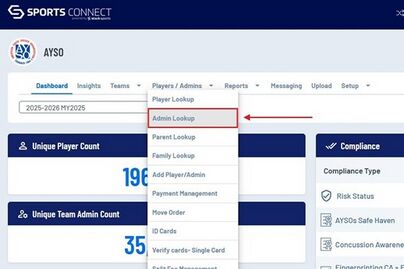
- Search for the Volunteer:
- Use filters such as Last Name, First Name, Email Address, or Admin ID to search.
- Make sure to check the correct Season: To search across all seasons, change the Season filter to “All Seasons”.
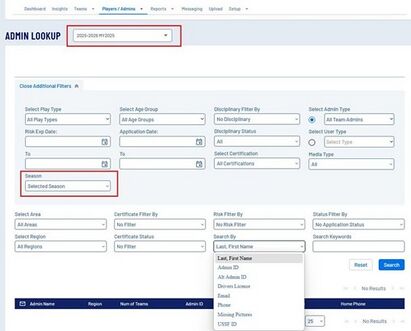
- Select and Edit the Record:
- Click on the volunteer’s name to open their record.
- Update the Email Address field as needed.
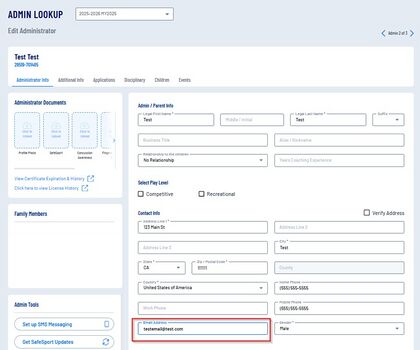
- Save the Changes:
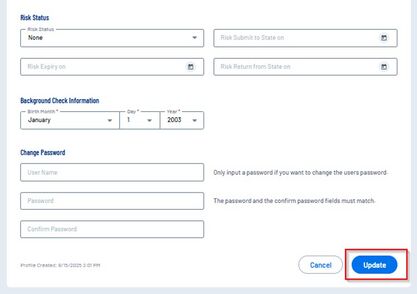
- Scroll to the bottom of the page.
- Click “Update” to save your changes.


❓ Need Help?
Contact the AYSO Membership Support Team at:
📧 cvpa@ayso.org
