Canva: Difference between revisions
From AYSO Wiki
Content deleted Content added
Hannahsmith (talk | contribs) No edit summary |
Hannahsmith (talk | contribs) No edit summary |
||
| (3 intermediate revisions by the same user not shown) | |||
| Line 6: | Line 6: | ||
'''Recommended before submitting:''' |
'''Recommended before submitting:''' |
||
* Region email address is listed on bottom of Region website under Contact Us section |
* Register with Region email address that is listed on the bottom of your Region website (under Contact Us section - add email in setting) |
||
* Use same AYSO email address to register |
* Use same AYSO email address to register |
||
* Use first and last name to register |
|||
* Create free Canva account with Region email- Do NOT opt-in to the free trial of Canva Pro. |
* Create free Canva account with Region email- Do NOT opt-in to the free trial of Canva Pro. |
||
* In Canva account settings go to your profile, scroll to "What will you be using Canva for?", select "Non-profit or charity". |
* In Canva account settings go to your profile, scroll to "What will you be using Canva for?", select "Non-profit or charity". |
||
| Line 43: | Line 44: | ||
* [https://ayso.io/AprilMarketingKit April Marketing Kit Canva Templates] 2026 |
* [https://ayso.io/AprilMarketingKit April Marketing Kit Canva Templates] 2026 |
||
* [https://ayso.io/MayMarketingKit2026 May Marketing Kit Canva Templates] 2026 |
* [https://ayso.io/MayMarketingKit2026 May Marketing Kit Canva Templates] 2026 |
||
* [https://ayso.io/JuneMarketingKit2026 June Marketing Kit Canva Templates] 2026 |
|||
==== 🖥️ '''Stack Sports Region Website Banners:''' ==== |
==== 🖥️ '''Stack Sports Region Website Banners:''' ==== |
||
| Line 63: | Line 65: | ||
* Share during volunteer and parents meetings. |
* Share during volunteer and parents meetings. |
||
==== '''📄 Volunteer Recruitment Flyers |
==== '''📄 Volunteer Recruitment Flyers''' ==== |
||
* Volunteer Recruitment Flyer 2025: https://ayso.io/VolunteerRecruitmentFlyerTemplate2025 |
* Volunteer Recruitment Flyer 2025: https://ayso.io/VolunteerRecruitmentFlyerTemplate2025 |
||
* Volunteer Recruitment Flyer 2026: https://ayso.io/VolunteerCanvaTemplateJan2026 |
* Volunteer Recruitment Flyer 2026: https://ayso.io/VolunteerCanvaTemplateJan2026 |
||
| Line 91: | Line 93: | ||
==== '''🌸 Thank You - Spring Season''' ==== |
==== '''🌸 Thank You - Spring Season''' ==== |
||
* '''🖥️''' Modern: <nowiki>https://ayso.io/FAQWebsiteBannerModern</nowiki> |
|||
* |
|||
* '''🖥️''' Default: <nowiki>https://ayso.io/FAQWebsiteBannerDefault</nowiki> |
|||
* '''🖥️''' Modern 2: <nowiki>https://ayso.io/FAQWebsiteBannerModern2</nowiki> |
|||
* 📱 Social Graphic: <nowiki>https://ayso.io/JunePostTemplates2026</nowiki> |
|||
==== '''🍂 Thank You - Fall Season''' ==== |
==== '''🍂 Thank You - Fall Season''' ==== |
||
Latest revision as of 17:13, 19 May 2026

Regions are able to use the Pro features of Canva at no cost.
Before you begin the process of requesting the nonprofit benefits create a free Canva account using the email address associated with your Association Platform profile.
Recommended before submitting:
- Register with Region email address that is listed on the bottom of your Region website (under Contact Us section - add email in setting)
- Use same AYSO email address to register
- Use first and last name to register
- Create free Canva account with Region email- Do NOT opt-in to the free trial of Canva Pro.
- In Canva account settings go to your profile, scroll to "What will you be using Canva for?", select "Non-profit or charity".
- Region website has a custom AYSO URL - Ex. ayso9697.org or aysoCityName.org
- Email support@ayso.org requesting a custom domain name
Application Process: VIDEO TUTORIAL
- Open an incognito tab and log into Canva with free Region Canva account
- Go to https://www.canva.com/canva-for-nonprofits/.
- Click Apply for Canva Nonprofits.
- Click Get Started
- For Type of nonprofit choose Registered nonprofit organization.
- For Organization name or ID, enter AYSO's tax ID number (95-6205398).
- Scroll to the bottom and choose "I don't see my nonprofit"
- Enter your Organization Name (Region XXX), Region website, IRS, and tax ID (95-6205398).
- Submit AYSO W-9
- Enter your first and last name, and click submit.
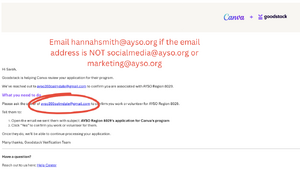
Make sure the email listed is marketing@ayso.org or socialmedia@ayso.org - If everything looks good please email marketing@ayso.org so we can look out for your Canva application!


Once the request is received, it will be approved by the socialmedia@ayso.org group. The requestor's identity & affiliation with AYSO will be verified through the Affinity Platform.
Canva Support
Email Marketing@ayso.org for Canva onboarding support.
Canva Templates
Social Media📱 , Website Banners 🖥️, Email 📧, Facebook Covers 👍, Flyers 📄:
- January Marketing Kit Canva Templates 2026
- February Marketing Kit Canva Templates 2026
- March Marketing Kit Canva Templates 2026
- April Marketing Kit Canva Templates 2026
- May Marketing Kit Canva Templates 2026
- June Marketing Kit Canva Templates 2026
🖥️ Stack Sports Region Website Banners:
- Fall, Winter, Spring, Volunteer Region SSC Banners
- Fall Thank You: https://ayso.io/FallThankYouSSCBannerCanva
- Coach, Referee, Spring Registration
- AYSO (Default): 960 x 365 pixels https://ayso.io/SpringRegAYSOBanner
- Modern 1: 1920 x 570 pixels https://ayso.io/SpringRegModernBanner
- Modern 2: 1706 x 679 pixels https://ayso.io/SpringRegModern2Banner
- Spring Coach & Referee Recruitment - February Valentine's Day Themed
- AYSO (Default): 960 x 365 pixels https://ayso.io/FebBannersDefault
- Modern 1920 x 570 pixels https://ayso.io/FebBannersModern
- Modern 2 1706 x 679 pixels https://ayso.io/FebBannersModern2
🖥️ Region Sports Connect Website - Page Banners: https://ayso.io/SSCpagebannercanva
📄 Follow on Social Media QR Code Flyer: https://ayso.io/Socialflyertemplate
- On Saturday game days, during halftime, walk around asking parents to follow. Most families are on their phones anyways waiting for second half to begin :) I did this at the Section 2 Games and had a lot of success!
- Share during volunteer and parents meetings.
📄 Volunteer Recruitment Flyers
- Volunteer Recruitment Flyer 2025: https://ayso.io/VolunteerRecruitmentFlyerTemplate2025
- Volunteer Recruitment Flyer 2026: https://ayso.io/VolunteerCanvaTemplateJan2026
- Youth Referee Recruitment Flyer 2026: https://ayso.io/YouthRefereeFlyerTemplate2026
⚽ Program Registration
- 📄 Registration Flyer 2026: https://ayso.io/FallCanvaTemplateJan2026
- 📄 Registration Flyer 2025: https://ayso.io/RegistrationFlyerTemplate
- 📄 Alliance Canva Flyer: https://ayso.io/AllianceFlyerCanva
- 📄 Extra Canva Flyer: https://ayso.io/ExtraFlyerTemplate
- 📄 EPIC Registration: https://ayso.io/EPICTemplateCanvaJan2026
- 📄 AYSO PLAY! Flyer: https://ayso.io/PLAYTemplateCanvaJan2026
- Yard Sign Soccer Registration: https://ayso.io/RegionYardSign2025
- Post-Registration Parent Packet: https://ayso.io/ParentPacketTemplate
- Registration Discount/Coupon Post-cards: https://ayso.io/PostcardRegionTemplateCouponCode, Stack Sports Payment Coupons Instructions
⚽ EPIC
- 📄 EPIC Registration Flyer: https://ayso.io/EPICTemplateCanvaJan2026
- 📱 Social Media: https://ayso.io/6PhilosophiesTemplatePosts (Everyone Plays)
- 🖥️ Sports Connect Website - Page Banners: https://ayso.io/SSCpagebannercanva
- 🖥️ Sports Connect Website Banner Templates
- 🖥️ Sports Connect Template Page: https://www.ayso9697.org/Default.aspx?tabid=976165
🌸 Thank You - Spring Season
- 🖥️ Modern: https://ayso.io/FAQWebsiteBannerModern
- 🖥️ Default: https://ayso.io/FAQWebsiteBannerDefault
- 🖥️ Modern 2: https://ayso.io/FAQWebsiteBannerModern2
- 📱 Social Graphic: https://ayso.io/JunePostTemplates2026
🍂 Thank You - Fall Season
- 👍 Fall Thank You - Facebook Page Cover Canva Template: https://ayso.io/FallFacebookCoverCanva
- 🖥️ Fall Thank You - Sports Connect Banner Canva Template: https://ayso.io/FallThankYouSSCBannerCanva
- 📱 Fall Thank You Canva Template IG Story - Add your Region Logo! https://ayso.io/FallThankYouIGStoryCanva
- Instagram Story Stickers:
- Link - add review/survey link,
- Add Yours (Photo) - season & volunteers,
- Question - prompt to share highlights and memories from the season, volunteer appreciation
- Instagram Story Stickers:
Region Sponsorships & Fundraising:
- Sponsorships & Local Partnerships: https://ayso.io/RegionSponsorshipGuidelines2025
- AYSO Region Sponsorship Template Deck
- Sample Sponsorship One-Pager