
Dynamic Certificate Data Report
From AYSO Wiki
This report will show one line per volunteer and includes the following information about volunteers: Risk Submit Date, Risk Status, HIGHEST Coaching License Level, HIGHEST Referee Grade, Safe Haven, Concussion Awareness, SafeSport, and Sudden Cardiac Arrest.
To run a report that shows volunteers’ certifications, please log in to the Association Platform; Access to the Association Platform
Here is a video on use of this report: https://youtu.be/fkRBfs6pfCY
Once you log in, please follow the steps listed below:
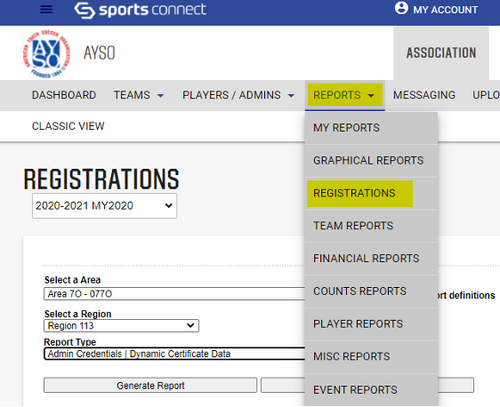
- Click on Reports then Registrations on the drop down menu.
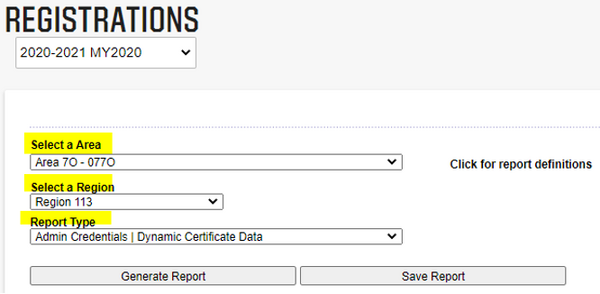
- Select your Area and Region if it was not automatically selected for you. Then select the Report Type: Admin Credentials | Dynamic Certificate Data.
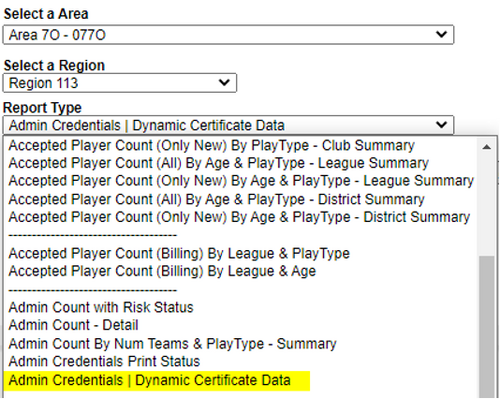
- Select Admin Credentials-Dynamic Certificate Data.
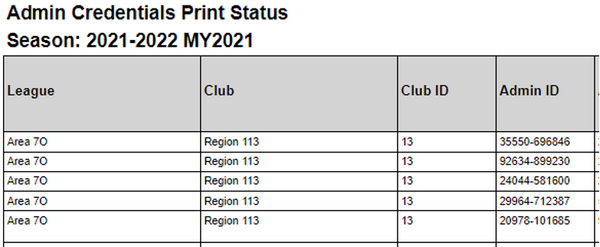
- The report will display, and you can also export to Excel. The report includes certifications, risk status, and many other volunteer details.


Support
Need Help?
Stack Association Support is here to help. Whether you're having technical issues or just have a quick question, our team is ready.